Claims repo feature
Overview
This feature installs the workflows used to manually hydrate and delete GitHub and Terraform Workspace claims, import existing GitHub resources into claims, and keep claims’ features up to date.
This feature installs the workflows necessary for manually hydrating and deleting GitHub and TFWorkspace claims, plus two additional workflows to import manually created GitHub resources into GitHub claims and a pr-verify workflow.
Local claims runner
Use the provided docker-compose.yaml when you want to run Firestartr CLI commands against a local checkout of the claims repo.
- Set the image tag you want to run, if needed, with
FIRESTART_CLI_IMAGE_TAG. - Set
TF_CMDto the command you want the container to execute. - Set
CLAIMto the TFWorkspace claim name you want to target. - Run
docker compose upfrom the claims repo root.
The compose service mounts your local claims repo checkout (including the claims/ directory) plus your ~/.kube and ~/.azure directories so the CLI can reach local credentials and repository files. The image comes from ghcr.io/firestartr-pro/firestartr, so picking the right tag matters when you need a specific CLI build or plan behavior.
Hydrating claims
Create a PR with the desired changes. Check the changes that have been commited are the changes you’ve actually done.
Once the
pr-verifyworkflow is finished, if there are no errors, merge your PR into the main branch.Head over to the
Actionstab of theclaimsrepo and select the<Your claim type> claim: hydrateworkflow on the left side list.
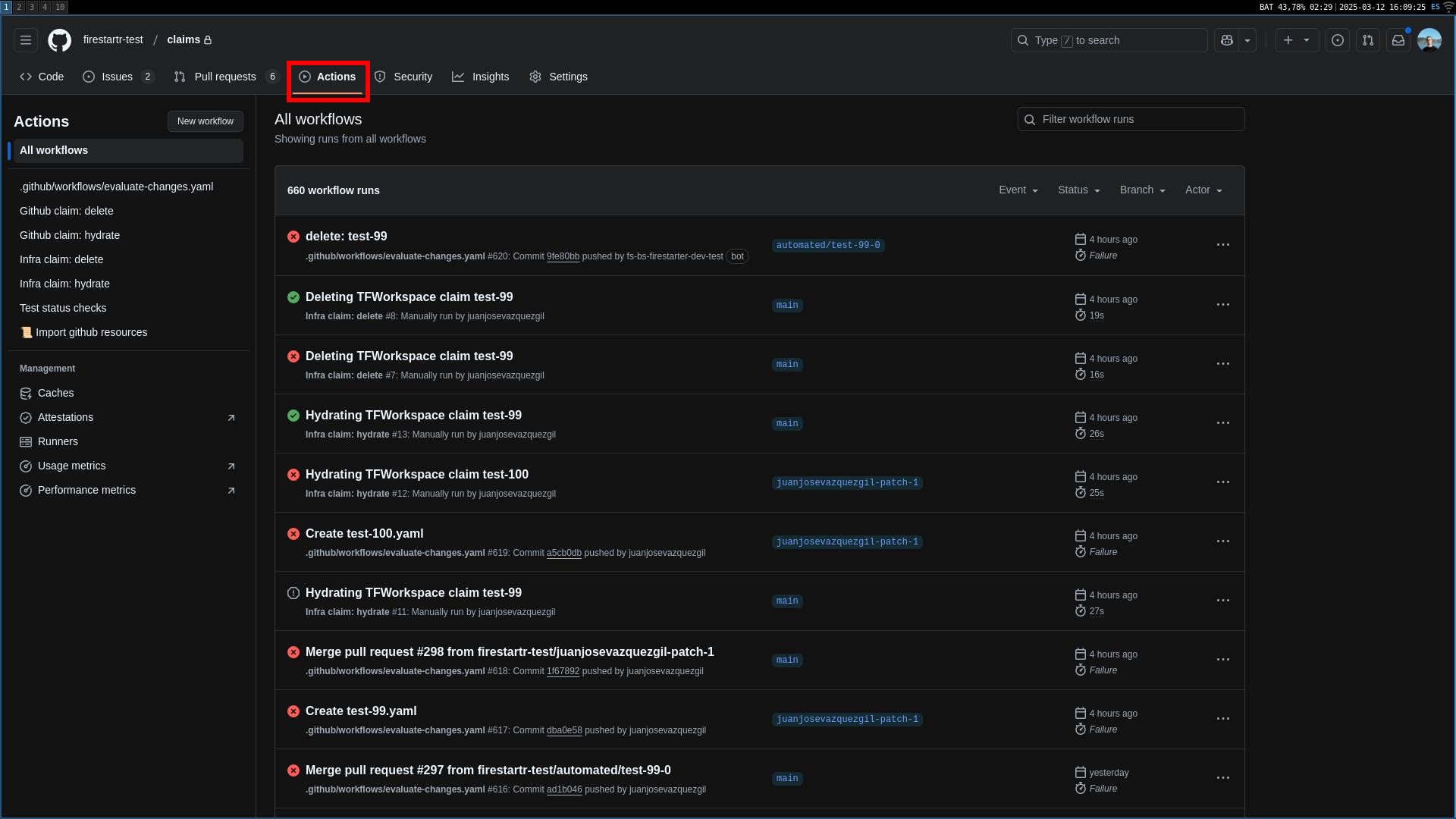 The Actions tabs
- Select
Run workflowon the right hand side of the screen, introduce the name of the claim to be hydrated and select the claim type (if it is a GitHub claim). NOTE: the name of the claim should be the value of the fieldnameinside the claim YAML. Setting this value to the file name may result in the workflow not working as expected.
Available GitHub claim types — exactly the kinds the claim type dropdown offers and the workflows route:
ComponentClaim— hydratesFirestartrGithubRepository,FirestartrGithubRepositoryFeature, andFirestartrGithubRepositorySecretsSectionCRs.UserClaim— hydratesFirestartrGithubMembershipCRs.GroupClaim— hydratesFirestartrGithubGroupCRs.OrgWebhookClaim— hydratesFirestartrGithubOrgWebhookCRs.OrgSettingsClaim— hydrates 3 CRs:FirestartrGithubOrganizationSettings,FirestartrGithubOrganizationVariableSectionwhen the claim declaresactions_variables, andFirestartrGithubOrganizationSecretsSection. The org secrets artifact is not pending: it is already rendered and applied, and hydrate and delete both carry it in their allowlists.
Note:
GitHubOrgClaimis no longer supported. If you have existing claim files usingkind: GitHubOrgClaim, migrate them tokind: OrgSettingsClaim.
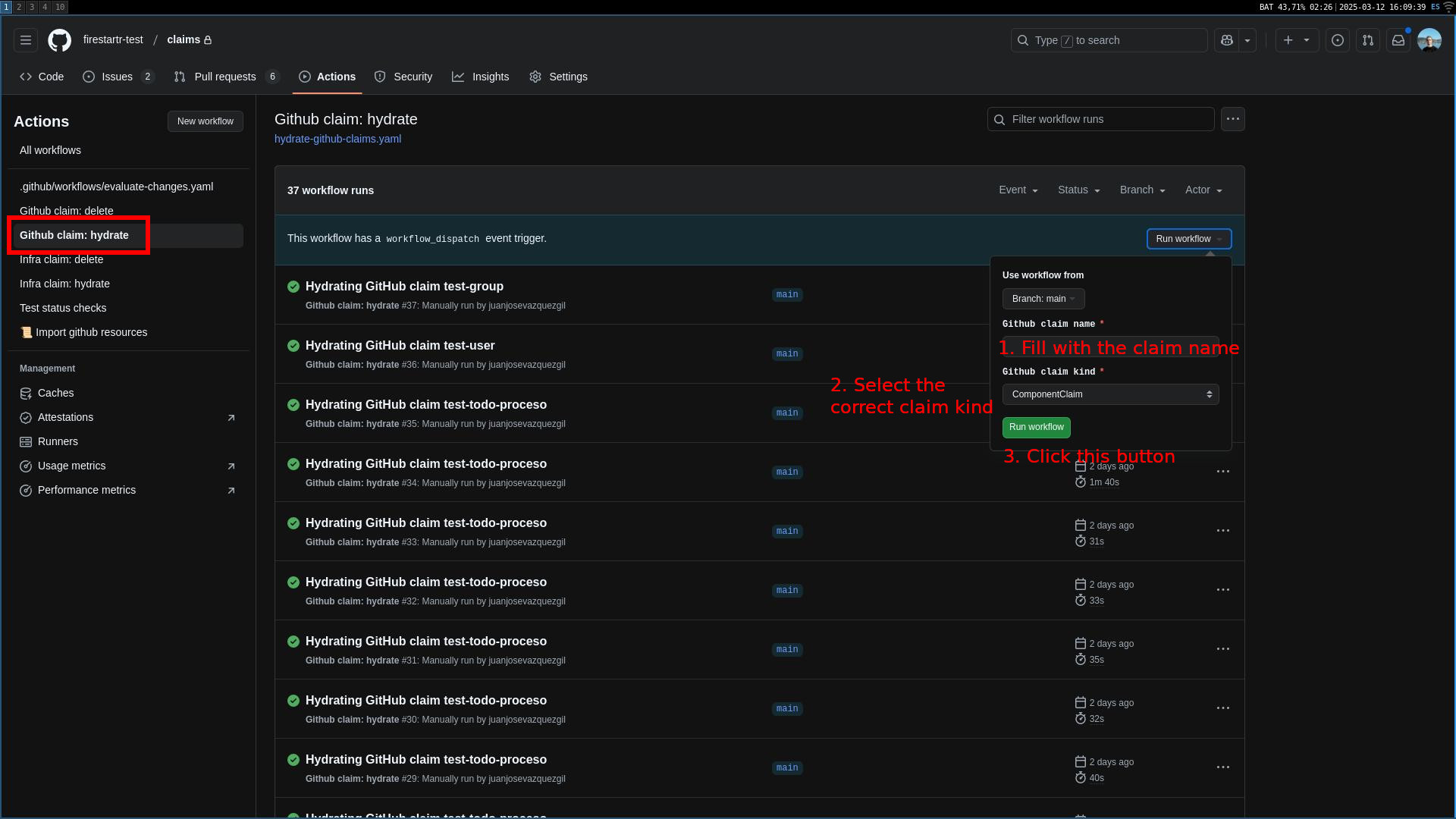 Hydrating a GitHub claim
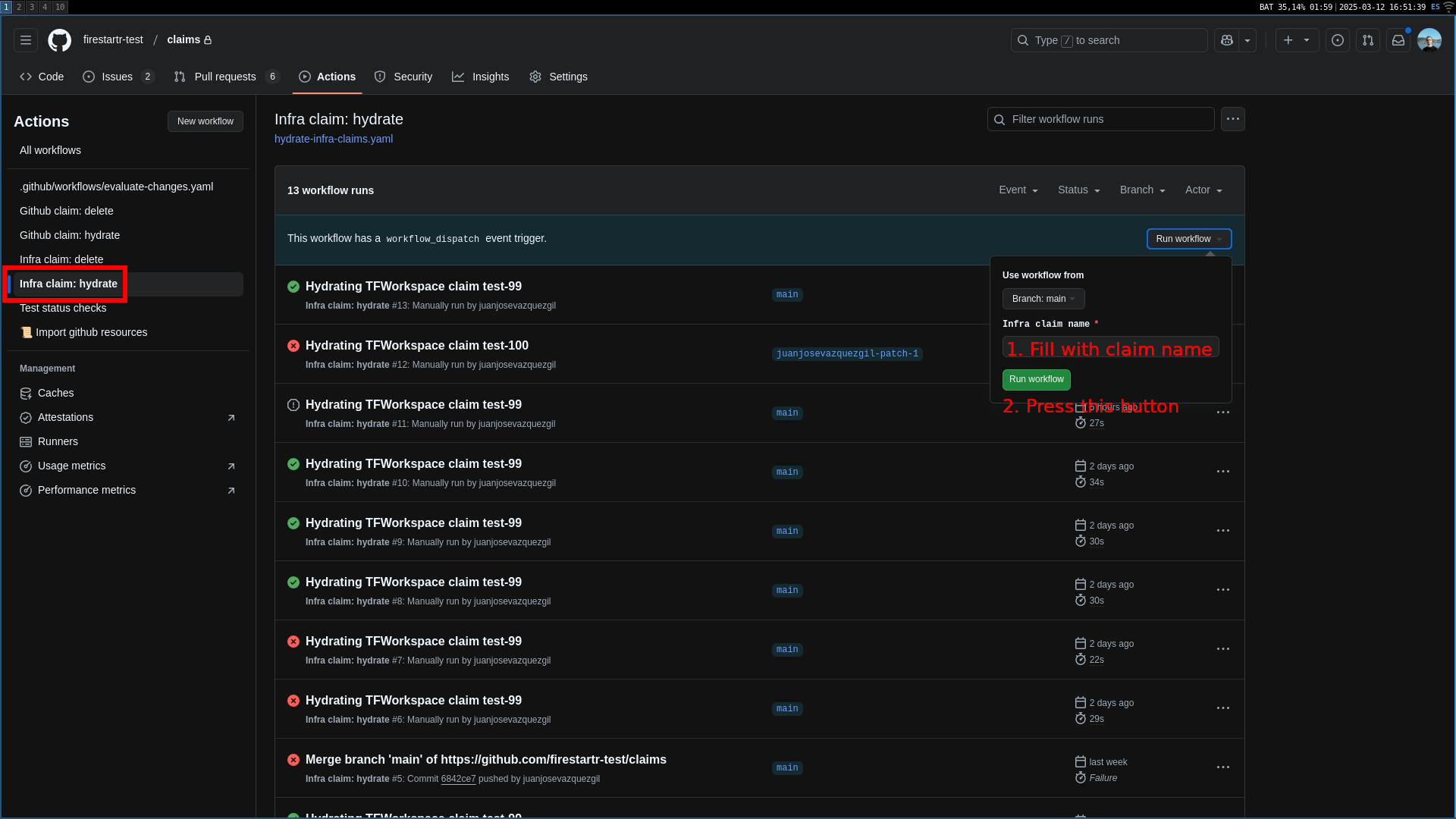 Hydrating a TFWorkspace claim
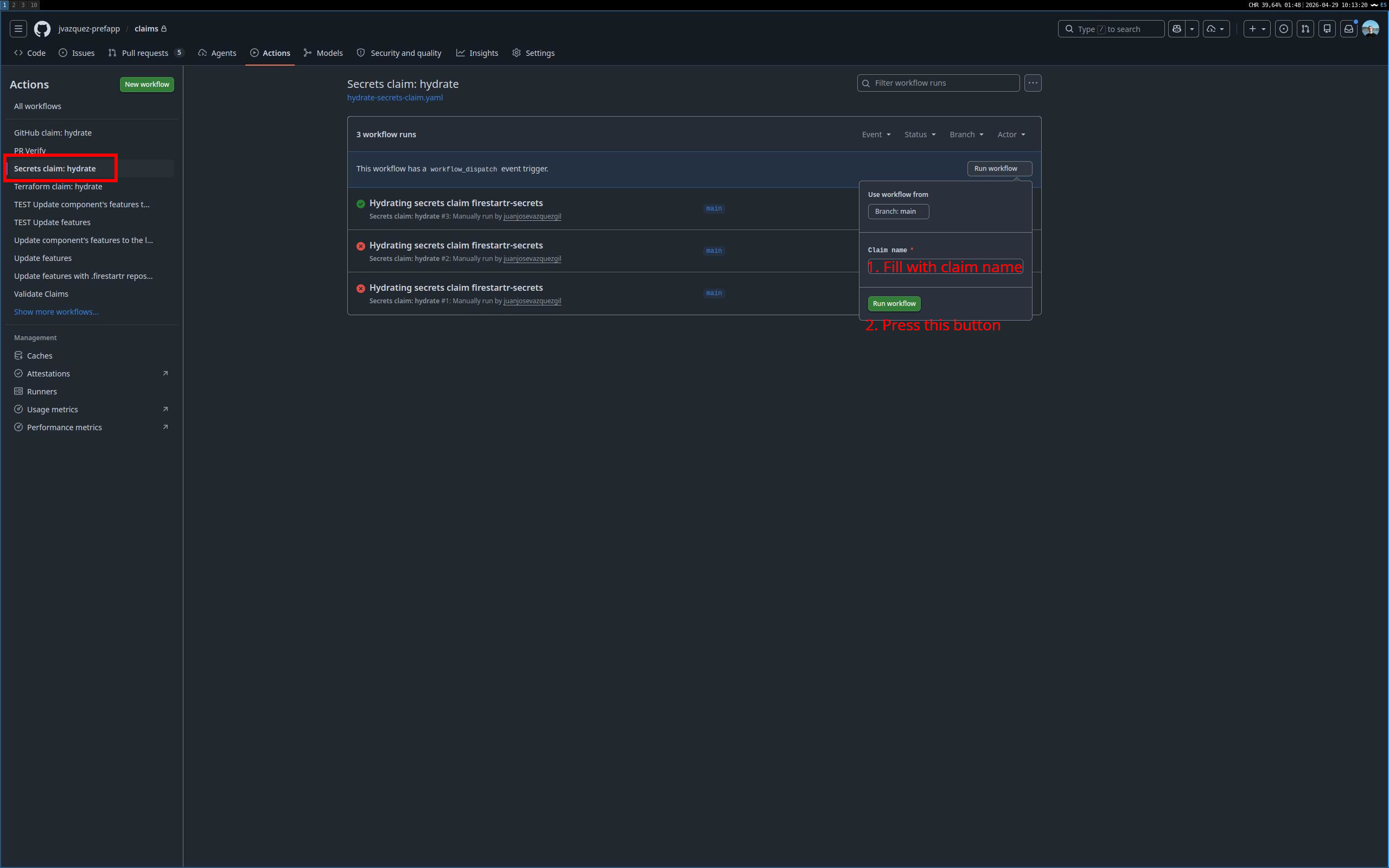 Hydrating a Secrets claim
- Press the green button and wait for the workflow to finish. When it’s done, click its entry in the list and there’ll be a link to the
state-github,state-infraorstate-secretsrepo PR. You can use it to review the PR and merge it if everything is correct.
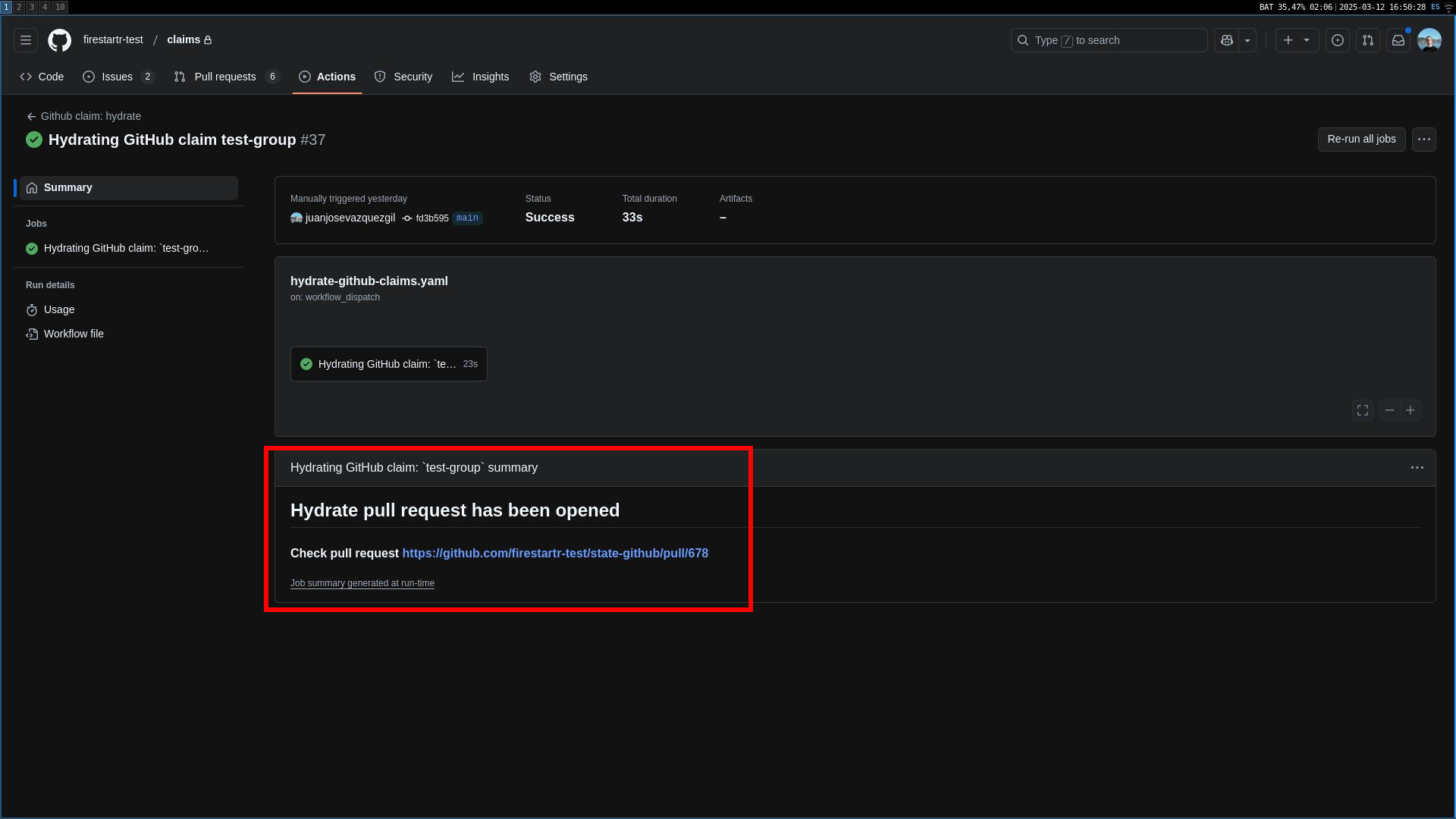 The action summary with a link to the state repo
Deleting claims
- Head over to the
Actionstab of theclaimsrepo and select the<Your claim type> claim: deleteworkflow on the left side list.
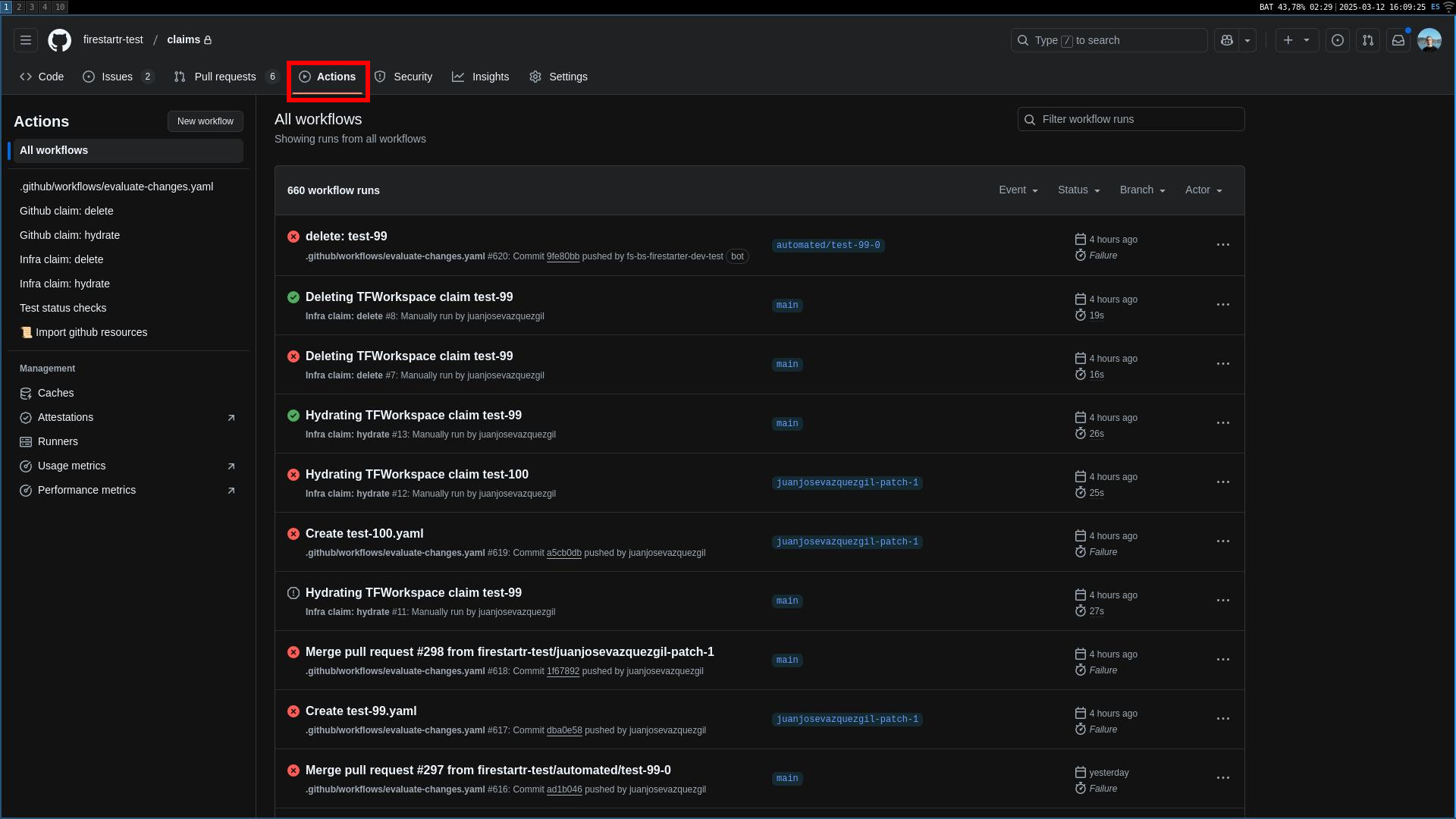 The Actions tabs
- Select
Run workflowon the right hand side of the screen, introduce the name of the claim to be deleted and select the claim type (if it is a GitHub claim). NOTE: the name of the claim should be the value of the fieldnameinside the claim YAML. Setting this value to the file name may result in the workflow not working as expected.
The same claim types listed for hydrating are available for deletion.
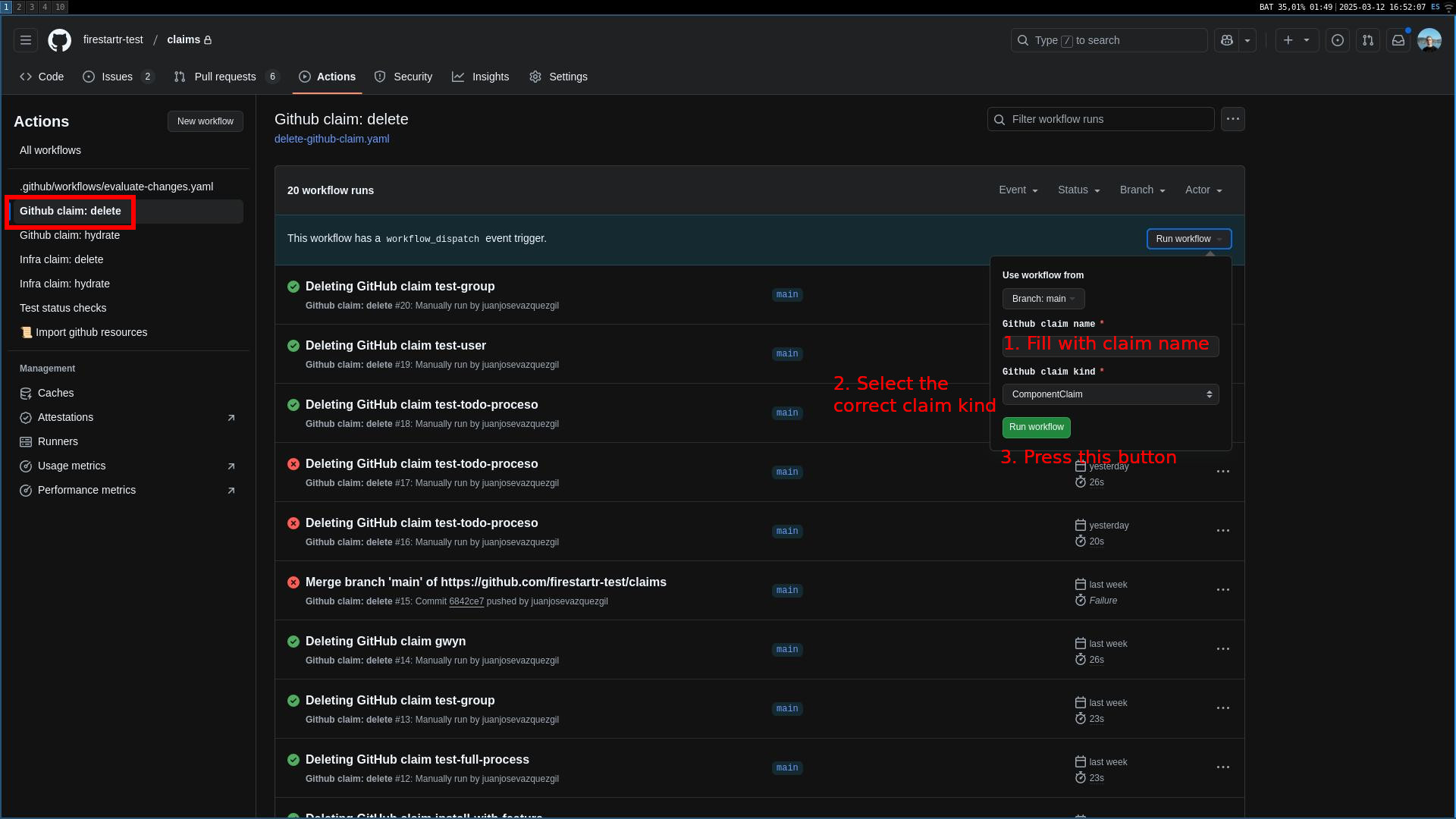 Deleting a GitHub claim
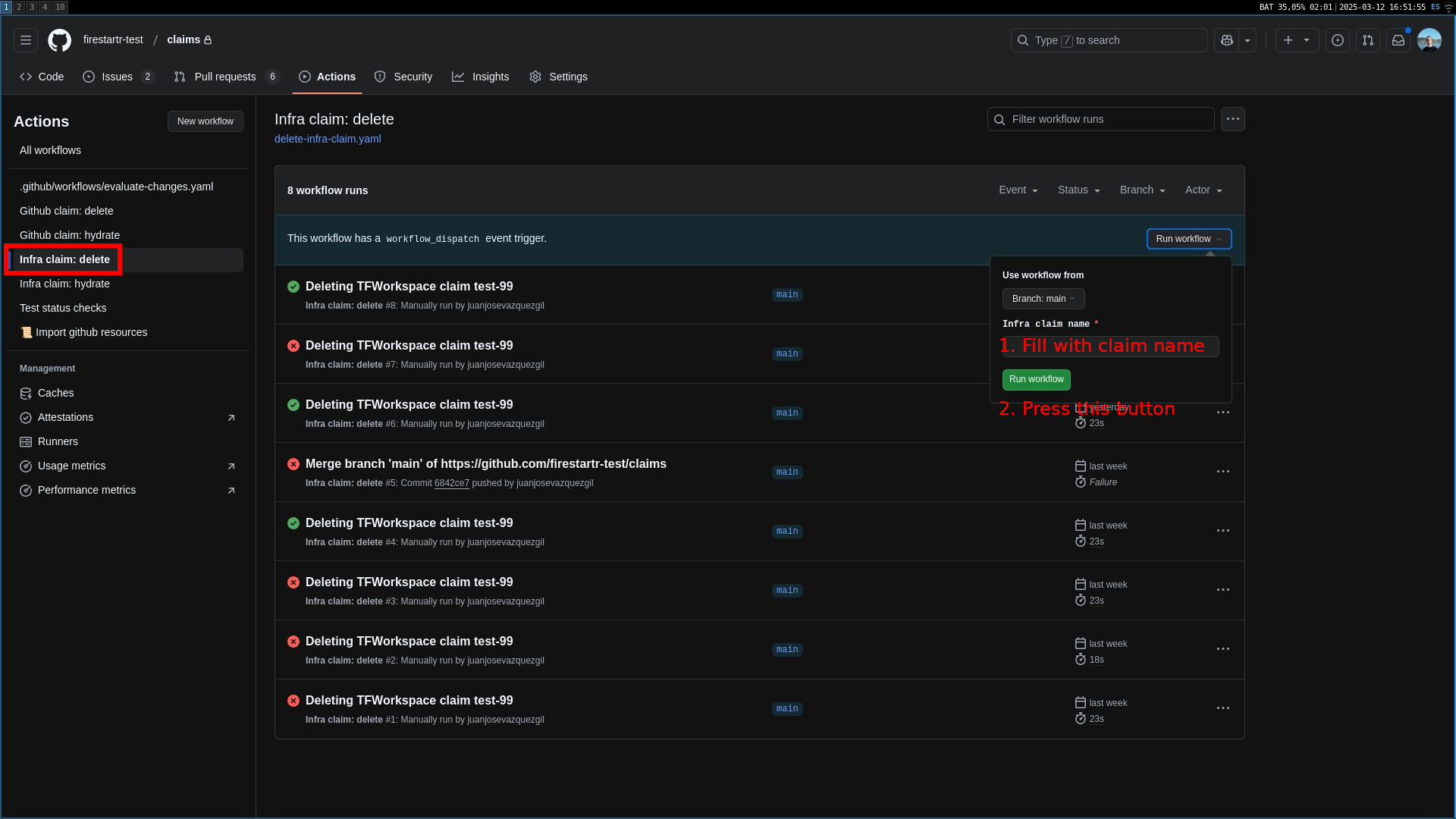 Deleting a TFWorkspace claim
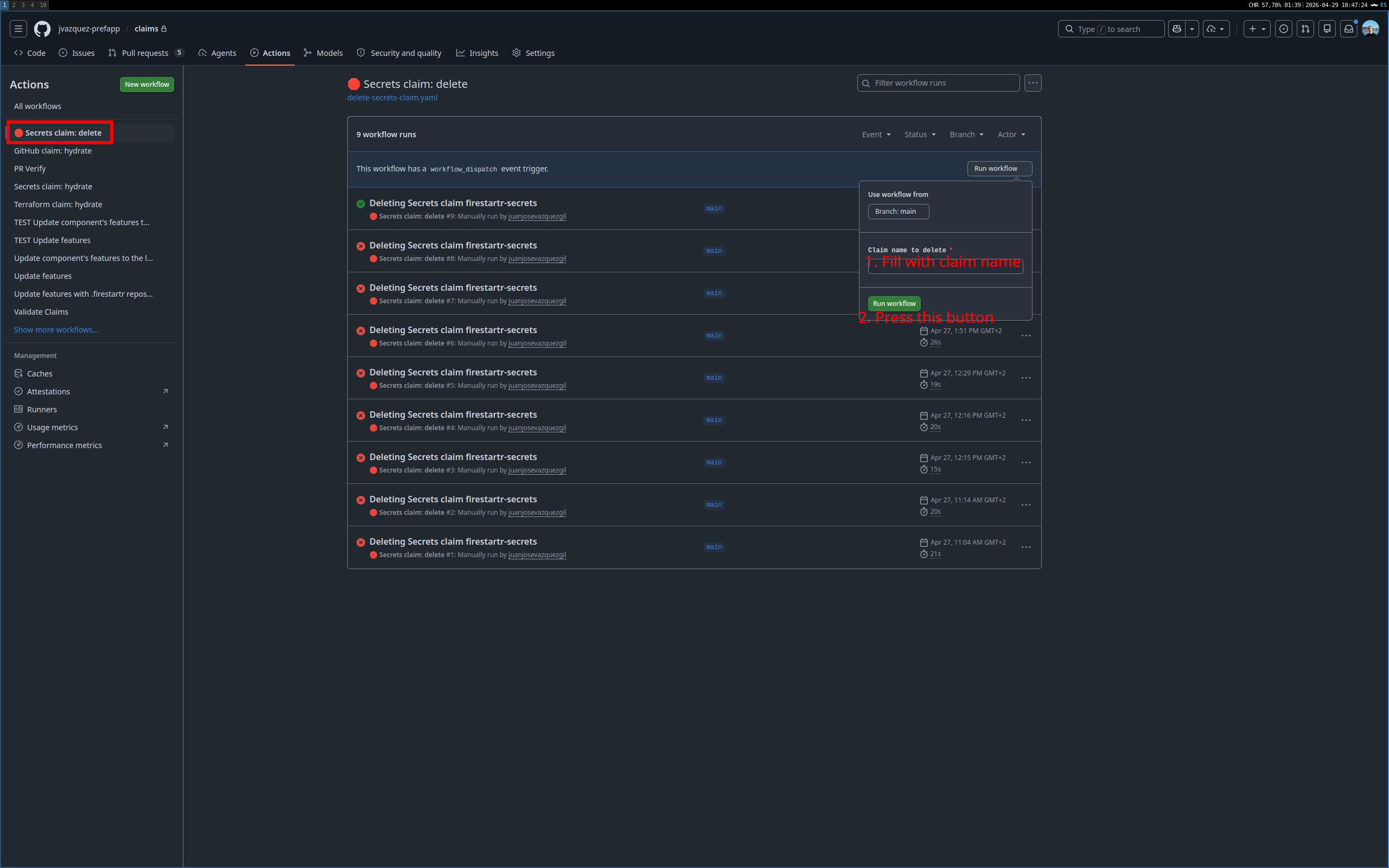 Deleting a Secrets claim
- Press the green button and wait for the workflow to finish. When it’s done, click its entry in the list and there’ll be two links: one to the
state-github,state-infraorstate-secretsrepo PR, deleting the CR file, and another to theclaimsrepo PR, deleting the claim file. You can use them to review both PRs and merge them if everything is correct.
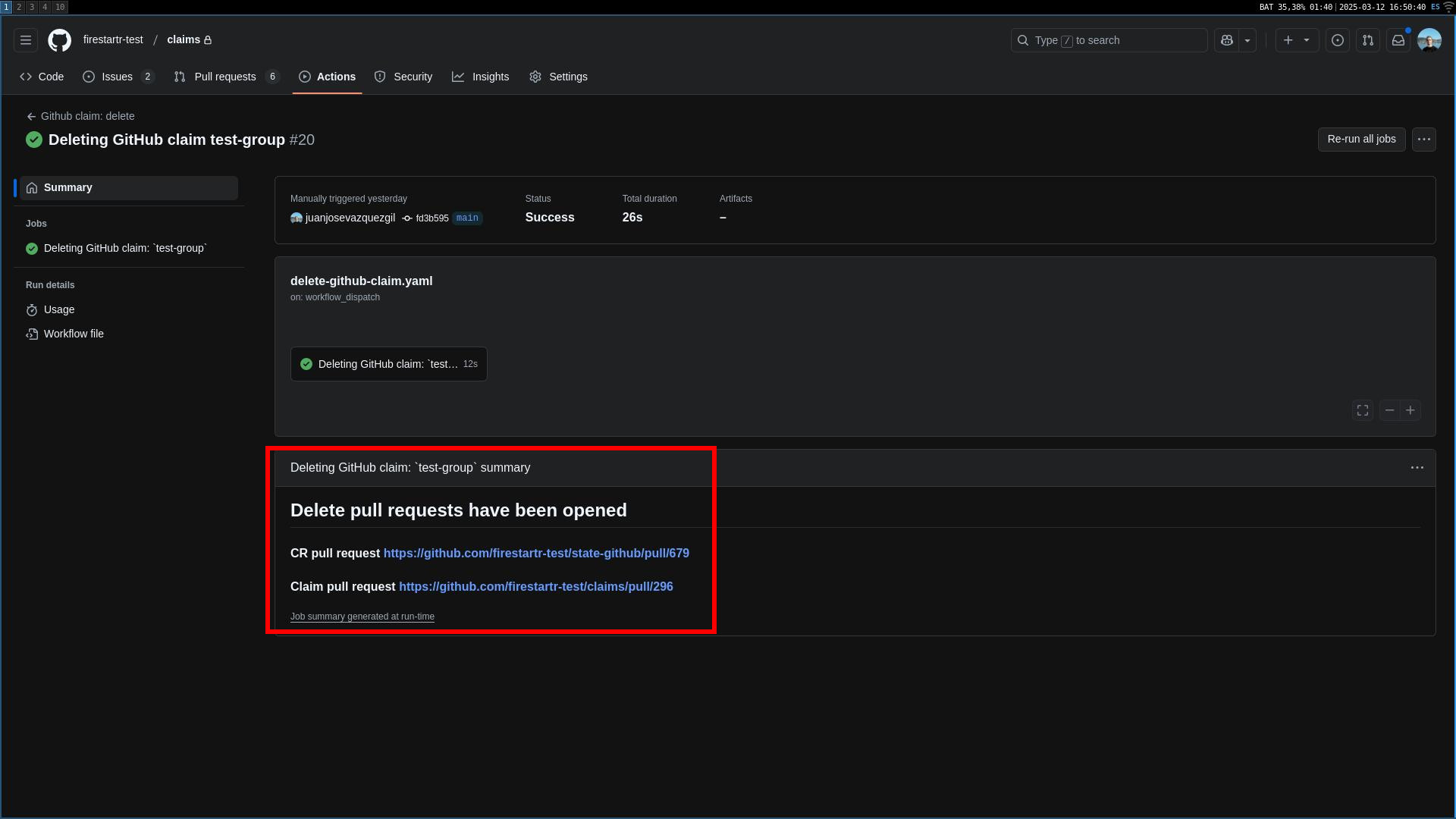 The action summary with two links to the state and claims repo
Import already created GitHub resources
- Head over to the
Actionstab of theclaimsrepo and select the📜 Import GitHub resourcesworkflow on the left side list.
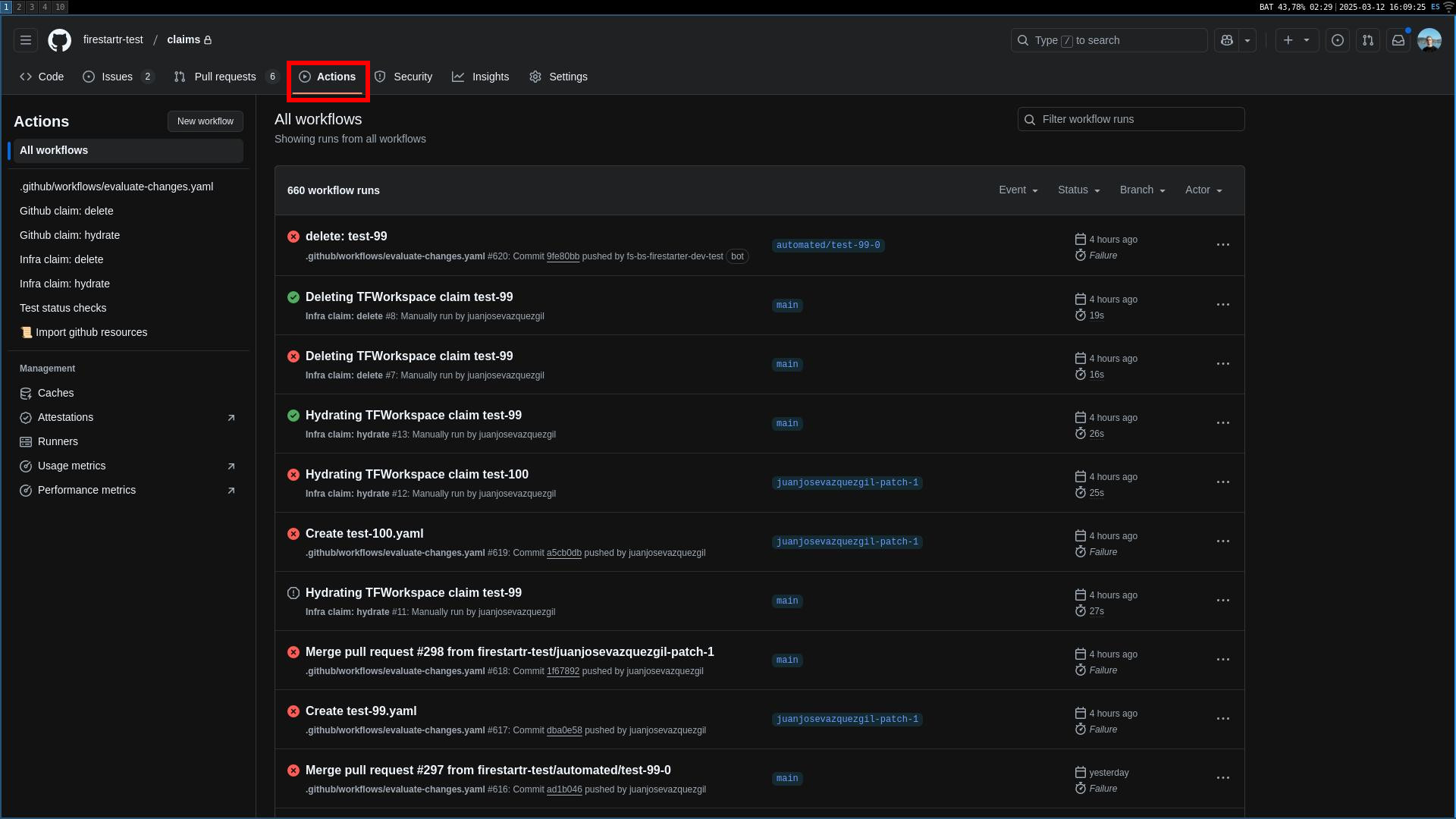 The Actions tabs
- Select
Run workflowon the right hand side of the screen, and add filters to the type of resources you want to import. The filters can be:
- REGEXP=[regex]: import all resources that match the regex [regex].
- NAME=[name]: import all resources with the name [name]. The name must be an exact match.
- SKIP=SKIP: skip this import.
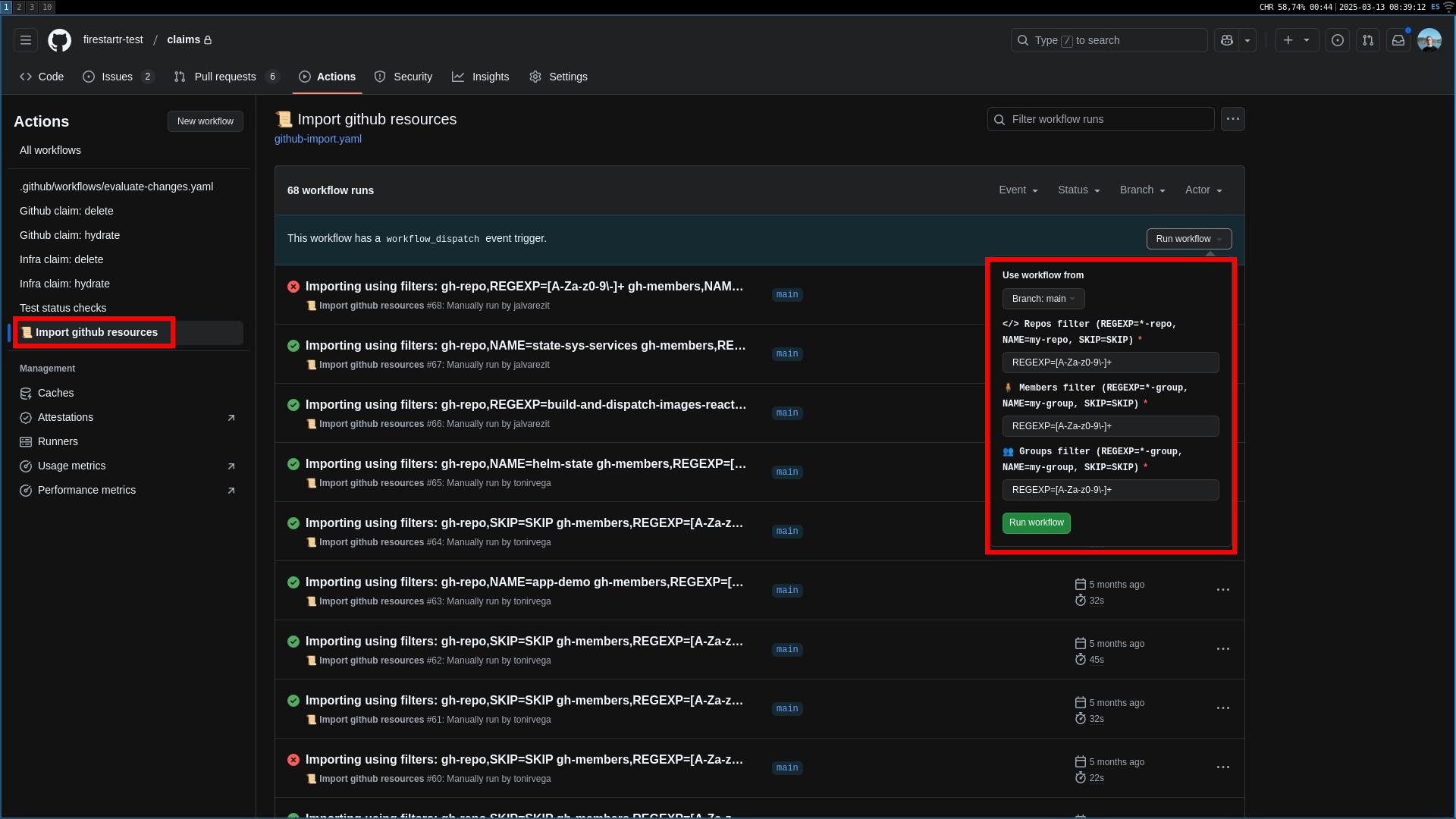
- Press the green button and wait for the workflow to finish. Once the workflow is finished, a PR will be created both in the
state-githubrepo and theclaimsrepo. Merge them both and the resource will be imported
Update feature in all claims
- Head over to the
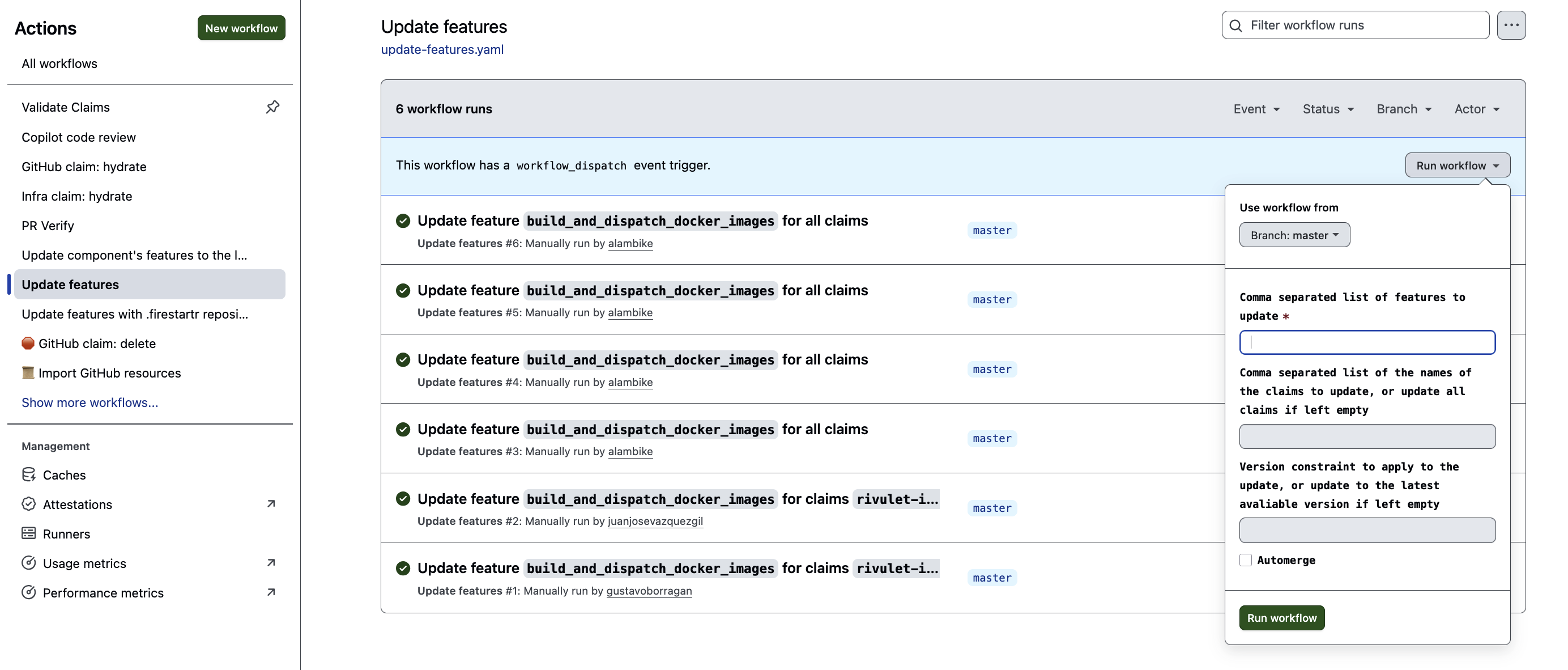
Actionstab of theclaimsrepo and select theUpdate featuresworkflow on the left side list. - Select
Run workflowon the right hand side of the screen, and add filters to narrow the features and claims you want to update. The filters can be:
- Features list: mandatory filter. Either a single feature name or a list of comma separated values, each being a different feature name.
- Claims list: optional filter. Either a single
claim.name, a list of comma separated values, each being a differentclaim.nameor an empty value, which will update all applicable claims. Note thatclaim.namerefers to the value of thenamefield inside theclaimYAML file and not to the name of the YAML file itself. - Version constraint: optional filter. Either a valid version, a valid version constraint or an empty value, which will update to the latest avaliable version. A valid version is a version that’s avaliable for all features in
Features list, in themajor.minor.patchsemver format, and will result in the feature being updated to that exact version. Valid version constraint documentation can be found here (comparisions work fine too) and will result in the feature being updated to the latest version avaliable that satisfies the specified constraint. The workflow will then create a PR for each claim that was updated, with a list of changes made since the version that was currently installed up until the version that was updated to. Merge them all and then hydrate the claims. - Automerge: optional filter. Setting this value to
truewill automerge the PRs created by this workflow as long as they pass all checks and have no conflicts. Defaults tofalse.
💡 If you are using a ref instead of a version for the feature you want to update, the workflow will trigger the hydration process, to update the claims with the latest changes from the ref. In this case, the version constraint filter will be ignored.
Massively updating claims’ features
- Head over to the
Actionstab of theclaimsrepo and select theUpdate claims' featuresworkflow on the left side list.
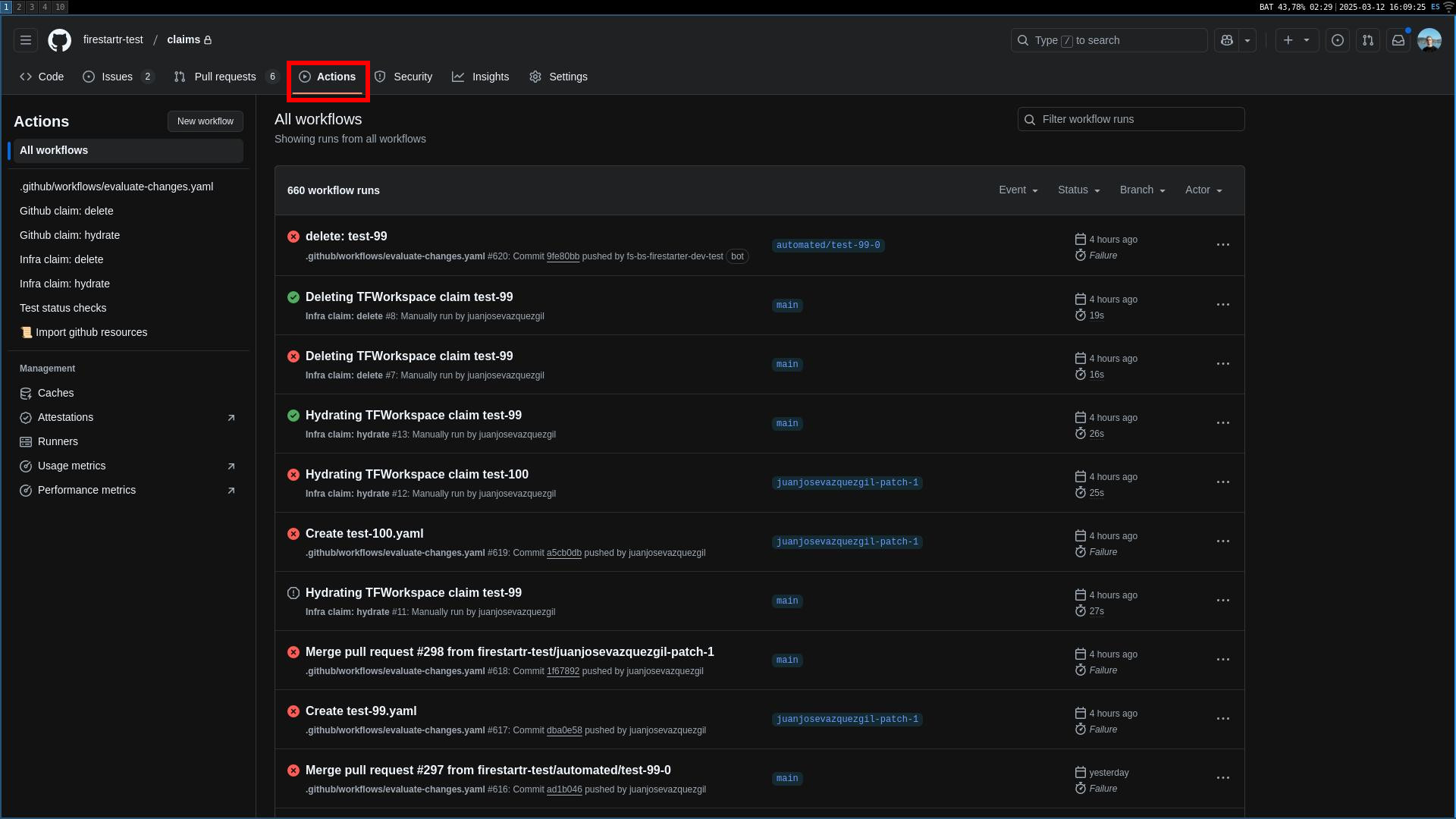 The Actions tabs
- Select
Run workflowon the right hand side of the screen, and add filters to narrow the features and claims you want to update. The filters can be:
- Features list: mandatory filter. Either a single feature name or a list of comma separated values, each being a different feature name.
- Claims list: optional filter. Either a single
claim.name, a list of comma separated values, each being a differentclaim.nameor an empty value, which will update all applicable claims. Note thatclaim.namerefers to the value of thenamefield inside theclaimYAML file and not to the name of the YAML file itself. - Version constraint: optional filter. Either a valid version, a valid version constraint or an empty value, which will update to the latest avaliable version. A valid version is a version that’s avaliable for all features in
Features list, in themajor.minor.patchsemver format, and will result in the feature being updated to that exact version. Valid version constraint documentation can be found here (comparisions work fine too) and will result in the feature being updated to the latest version avaliable that satisfies the specified constraint. - Automerge: optional filter. Setting this value to
truewill automerge the PRs created by this workflow as long as they pass all checks and have no conflicts. Defaults tofalse.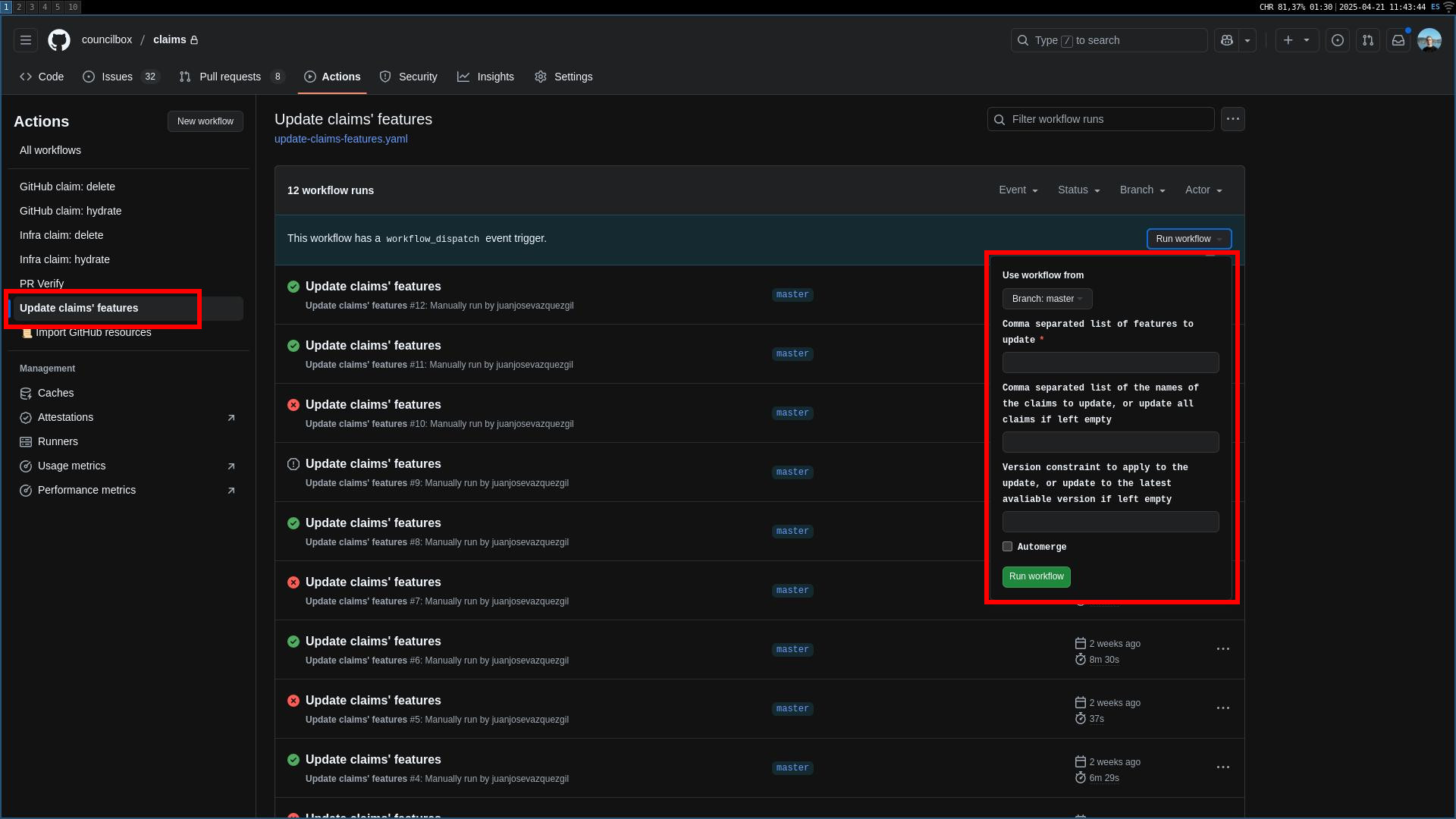
- Press the green button and wait for the workflow to finish. Once the workflow is finished, a PR will be created for each claim that was updated. The PR body will contain a list of changes made since the version that was currently installed up until the version that was updated to. Merge them all and then hydrate the claims
Feature arguments
state_github_repo: the name of the repository where the GitHub related CRs are stored. Defaults tostate-githubstate_infra_repo: the name of the repository where the Terraform related CRs are stored. Defaults tostate-infrastate_secrets_repo: the name of the repository where the ExternalSecrets related CRs are stored. Defaults tostate-secretscatalog_repo: the name of the repository where the Backstage catalog related CRs are stored. Defaults tocatalogcustom_features_repo_owner: the GitHub user or organization that owns the custom features repository from which claim features are fetched. The GitHub App token used for that repository is minted against this owner. Defaults to the owner of the claims repository.
CLI version requirements
The workflows in this feature rely on the Firestartr CLI (@firestartr/cli) to render and import claims. Before running, they check that the CLI version pinned by the FIRESTARTR_CLI_VERSION repository variable satisfies the >=2.11.0 constraint. Set that variable to a release that satisfies the constraint. Snapshot builds (non-canonical semver versions) can skip the check via the --ignore-snapshots flag.
The check can be tuned with the cli_version_constraint argument (the minimum CLI version, defaults to >=2.11.0) and disabled entirely by setting cli_version_check_enabled to false (defaults to true).