State Repo Apps#
This feature enables GitOps-based deployment workflows for application state repositories.
An application state repository (state repo, generally named app-<name>) is a Git repository that holds the Kubernetes deployment configurations for an application, or infrastructure, and secrets related to a specific application or set of services that compose it.
It provides automated CI/CD pipelines for managing Kubernetes workloads, Terraform workspaces, and secrets through GitHub Actions and ArgoCD.
Overview#
The state_repo_apps feature installs GitHub Actions workflows that manage an application state repository, enabling three types of deployments:
- Kubernetes Workloads - Deploy containerized applications
- Terraform Workspaces - Manage infrastructure as code with TFWorkspace claims
- Secrets Management - Deploy and sync secrets using External Secrets Operator
All deployments follow a GitOps pattern where:
- changes are validated through pull requests to the repository default branch
- After merge, the deployment manifests (CRs) are rendered (hydrated) into new pull requests to the
deploymentbranch, one for every affected deployment coordinates. - ArgoCD is in charge of monitoring the
deploymentbranch and pull the changes from the repository to the destination cluster.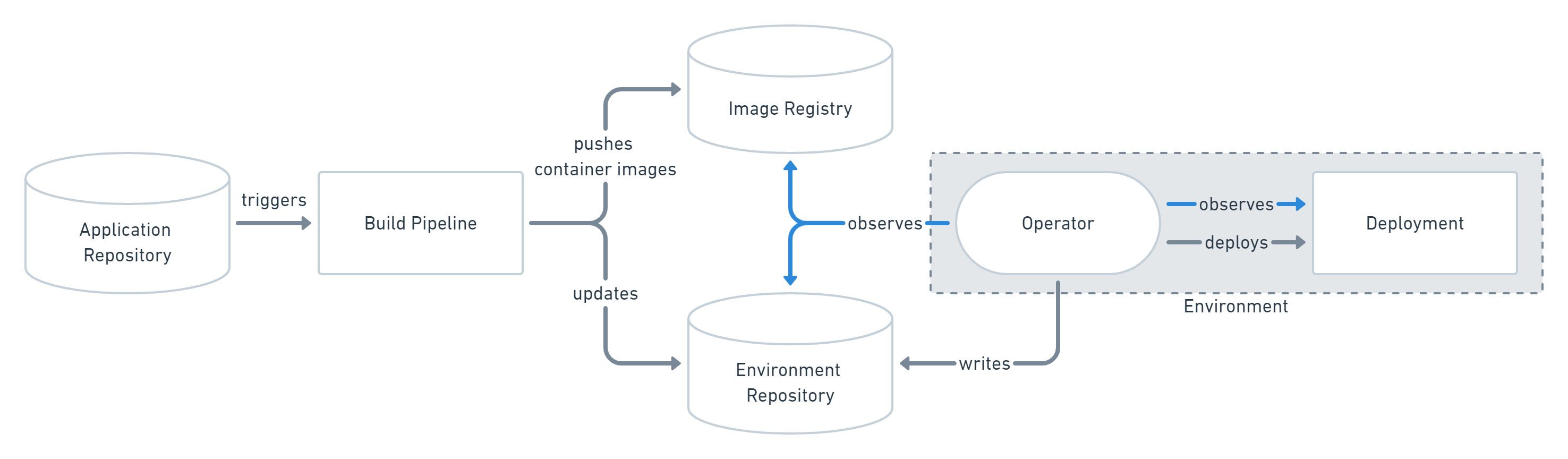
This feature follows the pull model, where the changes are hydrated and committed to the deployment branch and then ArgoCD detects those changes and applies them to the cluster, as opposed to the push model, where the changes are pushed to the cluster directly after being rendered.
Repository Structure#
The repository is structured with 2 head branches:
- the default branch (usually
masterormain), where users upload their deployment configurations. - the
deploymentbranch, where the CRs to be deployed are hydrated by thegenerate-deployment-<type>.yaml.
Each branch is structured as follows:
Default branch (main)#
Upon installation, three main directories are created: kubernetes, tfworkspaces, and secrets.
Each directory holds the dehydrated deployment files for its type and follows the expected folder structure described below:
kubernetesfolder structure:<platform>/<tenant>/<environment>. At the same level as theenvironmentfolder, an<environment_name>.yamlfile is expected, which contains the Helmfile release configuration for rendering the Helm charts.tfworkspacesfolder structure:<platform>/<tenant>/<environment>. This folder can contain multiple different, unrelatedTFWorkspaceClaims.secrets: the expected structure is:<tenant>/<environment>. This folder can contain multipleSecretsClaims.
Note that the deployment coordinates are defined by the folder structure, and must match the configuration in the
.firestartrrepository.
Deployment branch (deployment)#
This branch contains the hydrated deployments generated from the default branch config files. These files are Custom Kubernetes Resources (CRs) that will be deployed to the cluster and managed by its corresponding controllers.
The folder structure is similar to the default branch, as the same kubernetes, tfworkspaces, and secrets folders are created in both branches, with one exception: the tfworkspaces folder has no additional sub-folders, and all rendered TFWorkspaceClaim’s are placed directly inside it.
This branch shouldn’t be edited manually unless necessary; however, all changes should be done via PRs to the default branch.
Workflows Provided#
Validation#
- Validate PR (
validate-pr.yml) - Validates all pull request changes before merging
Manual Deployments#
- Generate Kubernetes Deployment (
generate-deployment-kubernetes.yml): Manually deploy Kubernetes workloads - Generate TFWorkspace Deployment (
generate-deployment-tfworkspaces.yml): Manually deploy Terraform workspaces - Generate Secrets Deployment (
generate-deployment-secrets.yml): Manually deploy secrets
Automatic Deployments#
- Auto-generate Deployments (
auto-generate-deployments.yml): Automatically create deployments pull-requests when changes are merged to the main branch, for all deployments affected by the changes.
Delete Deployments#
- Delete Kubernetes Deployment (
delete-deployment-kubernetes.yml) - Create deletion PR for Kubernetes workloads - Delete TFWorkspace Deployment (
delete-deployment-tfworkspaces.yml) - Create deletion PR for Terraform workspaces - Delete Secrets Deployment (
delete-deployment-secrets.yml) - Create deletion PR for deployed secrets
Auto-Update Workflows#
- Dispatch Image to Kubernetes (
dispatch-image-kubernetes.yml) - Auto-update Kubernetes workloads when new images are pushed - Dispatch Image to TFWorkspaces (
dispatch-image-tfworkspaces.yml) - Auto-update TFWorkspace images
Documentation#
For detailed information on each deployment type:
- Kubernetes Deployments - Complete guide for deploying containerized applications
- TFWorkspace Deployments - Guide for managing Terraform infrastructure
- Secrets Management - How to deploy and manage secrets
Key Features#
- GitOps-based deployment using ArgoCD
- Automated image updates with optional auto-merge
- Support for multiple helm chart registries (OCI, HTTPS)
- OIDC authentication for cloud providers (Azure, AWS)
- Pull request validation and preview
- Customizable rendering configurations
Quick Start#
- Configure your workload - Add configuration files to
kubernetes/,tfworkspaces/, orsecrets/directories, following the expected structure seen above. - Create a pull request to the default branch - The PR will be validated automatically.
- Merge to main - Once approved, merge your changes. This will trigger the hydration workflows.
- Deploy manually - Run the appropriate “Generate deployment” workflow from the Actions tab to create a PR to the
deploymentbranch with the rendered manifests. - Monitor ArgoCD - ArgoCD will detect changes in the
deploymentbranch and apply them to the cluster.
Additionally, within your organization, a .firestartr repository should exist (if it doesn’t, contact platform team). This repository contains various configuration files that need to be set up for the deployment process to work correctly. You can read more about it in the Firestartr documentation.
Auto-Update Setup#
Every time a new image is pushed to a container registry, an event can be sent to this repository to trigger an automatic update of the deployments using that image.
This is done through the dispatch-image-<type>.yaml workflows, which listen for repository dispatch events with the appropriate payload.
The payload is triggered normally from the service code repository, using the Firestartr’s Build and Dispatch Docker Images feature.
Auto-Merge Deployment PRs#
This feature can be optionally combined with automatic merging of the generated deployment pull-requests, by adding an empty AUTO_MERGE file to the deployment directory (e.g., kubernetes/my-platform/my-tenant/my-environment/AUTO_MERGE), in the repository default branch.
Configuration#
The workflows support customization through configuration files in .github/:
hydrate_k8s_config.yaml- Config file for Kubernetes deployments. Allows configuring the helmfile image version and additional commands for the container, before executing the helmfile rendering process.hydrate_tfworkspaces_config.yaml- Config file for TFWorkspace deployments. Allows configuring the firestartr image version and additional commands for the container, before executing the rendering process.
See the individual documentation files for complete configuration details and GitHub variables/secrets required.
The .firestartr Repository#
Additionally, within your GitHub organization, a .firestartr repository should exist (if it doesn’t, contact platform team).
This repository, managed by the Platform team, contains various configuration guardrails files that need to be set up for the deployment process to work correctly. You can read more about it in The dot-firestartr repository, but we will provide a small overview of the relevant configurations for this feature here:
- The platforms folder: contains the configuration for each
platforminside thekubernetesandtfworkspacesdeployments. Namely, it contains whattenants andenvironments are valid for eachplatform, and will be used to validate the subfolders inside thekubernetesandtfworkspacesfolders. You can read the full documentation here. - The validations folder: contains the configuration files used to validate the claims inside the
tfworkspacesfolder. Read more here. - The docker_registries folder: will be checked to create the Helm repository information for the Kubernetes deployments, if not already present in the
environment.yamlfile. Read more here.
Rollback#
This feature doesn’t offer a specific workflow or action to perform rollbacks. Instead, the expected way to rollback a deployment is any of the following:
Note that for all options the changes only affect the state repo. Further dispatches done from the code repo after a rollback will create pull-requests where the deployments will be updated as normal.
Option 1: using GitHub to revert a PR (recommended)#
Locate the deployment PR you need to rollback using GitHub’s interface, and revert it by pressing the Revert PR button. This will create a new PR reverting the deployment PR’s changes. Review this new PR and merge it as usual. This is the quickest and easiest way to rollback changes whenever available.

Option 2: manually edit the deployment branch (not recommended)#
- Pull the changes from the state repo (
git fetch origin), - checkout to the
deploymentbranch and manually edit the deployment files. - Create a PR with your changes and merge it.
This method allows for more flexibility and partial rollbacks, but is more error-prone and not recommended unless you really know what you are doing.